
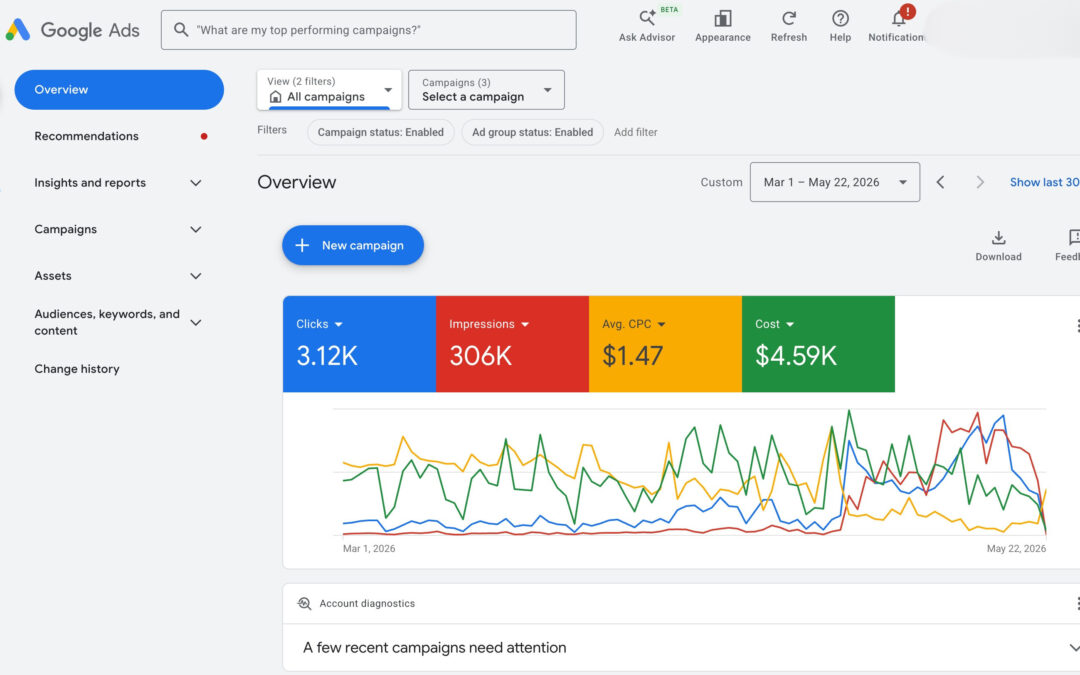
The real reason your Google Ads are failing
Rohan runs a SaaS company in Bangalore. He set up Google Ads, put in ₹50,000 for the month, and waited. Clicks came in. The dashboard looked busy. But by the 20th of the month, the budget was gone — and he had exactly 2 leads to show for it. Sound familiar?
If you have ever stared at a Google Ads dashboard wondering where your money went, you are not alone. Thousands of businesses in India — from startups to mid-sized agencies — pour money into Google Ads every single month and walk away with almost nothing.
The frustrating part? It is rarely about budget size. A company spending ₹5,00,000 a month can get worse results than one spending ₹20,000 — if the fundamentals are broken. We have seen this pattern repeatedly at Digital Narada, working with businesses across Delhi, Bangalore, Pune, and Mumbai.
This guide breaks down every major reason Google Ads fail — and more importantly, exactly how to fix each one. If you are also evaluating whether to run ads in-house or work with a paid ads agency in India, this article will help you ask the right questions.
Your budget is not the problem — your strategy is
The very first thing most advertisers do when their ads underperform is increase the budget. This is almost always the wrong move.
Think of Google Ads like a leaking bucket. Pouring more water in does not solve the leak — it just makes the puddle bigger faster. Before you touch your budget, you need to fix the holes.
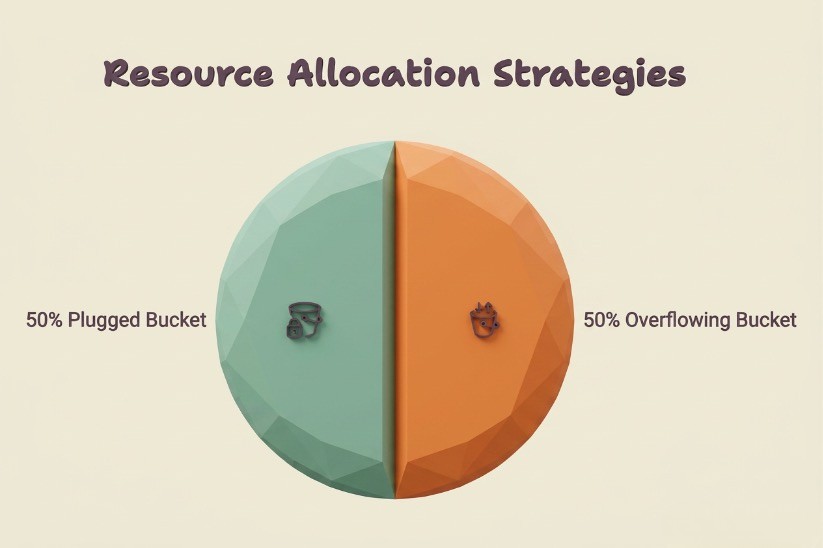
So what does a broken Google Ads strategy actually look like?
Here are the most common structural problems:
- Campaigns set up without a clear conversion goal
- Ad groups that mix unrelated keywords
- No negative keyword lists
- Broad match keywords running without any guardrails
- Smart campaigns that give Google too much control too early
According to a 2024 WordStream analysis, businesses waste an average of 76% of their Google Ads budget due to poor account structure and targeting. That means for every ₹1,00,000 you spend, ₹76,000 is essentially invisible.
If your business is in an early or growth stage, you might also want to read about paid ads agencies for startups to understand how paid ad strategies can accelerate growth for early-stage companies.
Wrong keywords: the #1 silent budget killer
Keywords are the foundation of every Google Ads campaign. Get them wrong and everything else collapses — no matter how brilliant your ad copy or how high your daily budget.
The broad match trap
When you add a keyword like “digital marketing” on broad match, Google will show your ad for searches like “digital marketing courses for beginners,” “what is digital marketing,” and even “digital marketing memes.” None of these people are your buyers.
Fix: Use exact match and phrase match for your core buying keywords. Reserve broad match modifier only for discovery campaigns with tight negative keyword lists and small budgets.
Informational vs commercial intent
Are the people clicking on your ads actually looking to buy — or just looking to learn?
This is one of the most overlooked keyword mistakes. A user searching “how does Google Ads work” is in research mode. A user searching “Google Ads management agency Mumbai” is ready to engage. These two people need completely different messaging — and they definitely should not both be clicking on the same ad.
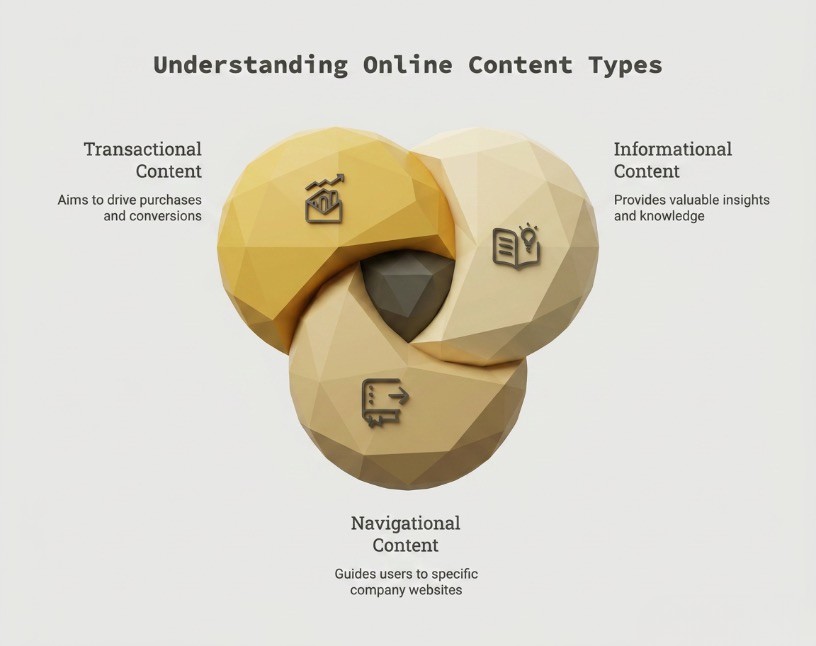
Sort your keywords into three buckets:
- Informational — write blog content for these, not ads
- Navigational — only bid if users might be looking for you specifically
- Transactional / commercial — these are your money keywords. Protect them and bid aggressively.
Negative keywords: your most underused weapon
A negative keyword list tells Google when NOT to show your ad. Without it, you are funding clicks from people who will never become customers.
Start every campaign with at least 50–100 negative keywords. Common ones to add immediately:
- “free,” “cheap,” “jobs,” “career,” “review,” “course,” “tutorial,” “DIY,” “salary”
For businesses in specific cities, this becomes even more important. If you are a paid ads agency in Delhi running ads nationally, you need to exclude searches from cities where you do not serve.
Your landing page is costing you more than your ads
Here is a hard truth: even with perfect keywords and brilliant ad copy, a weak landing page will destroy your campaign.
Google measures what happens after the click. If users bounce immediately, Google learns that your ad is not delivering a satisfying experience — and it penalises you with a lower Quality Score (more on this shortly). The result? You pay more per click than your competitors for the same keywords.
The message match problem
Your landing page must reflect exactly what your ad promised. If your ad says “Get 50% off Google Ads management this month” but the landing page talks about your entire range of services with no mention of the offer, visitors will leave immediately. This is called a message mismatch — and it is one of the biggest conversion killers in paid search.
What a high-converting landing page looks like
- A single, clear headline that mirrors the ad’s promise
- One primary call to action (not three CTAs competing for attention)
- Page load under 3 seconds (use Google PageSpeed Insights to check)
- Trust signals: testimonials, client logos, awards, or case studies above the fold
- Mobile-optimised layout (over 65% of Google Ads clicks happen on mobile in India)
If your landing page is a generic homepage, stop. Build dedicated campaign-specific pages for each offer. Even paid ads agencies in Bangalore that run ads for clients know that the landing page is half the battle.
Quality Score: the hidden lever that controls your ad costs
Quality Score is Google’s rating of the relevance and quality of your keywords, ads, and landing pages. It is scored out of 10 and has a direct impact on how much you pay per click.
This is the maths that most advertisers never see:
- A Quality Score of 10 can reduce your Cost Per Click (CPC) by up to 50%
- A Quality Score of 4 can increase your CPC by up to 75%
Two advertisers can be bidding the same amount — but the one with a higher Quality Score wins a better ad position at a lower cost. This is Google’s way of rewarding relevance.
So how do you improve your Quality Score?
- Tighten your ad groups: each ad group should contain only 5–15 tightly related keywords
- Match your ad copy to your keywords precisely
- Ensure your landing page content directly addresses the keyword’s search intent
- Improve page speed and mobile experience
- Monitor Expected CTR, Ad Relevance, and Landing Page Experience — the three sub-scores that make up Quality Score
Ad copy mistakes that drive up costs and lower clicks
Your ad copy is your first impression. In three headlines and two descriptions — roughly 200 characters total — you need to earn the click over every competing ad on the page.
The most common ad copy mistakes
- Generic headlines that say nothing specific: “Best Digital Marketing Agency” means nothing to a user. “Google Ads management for B2B companies in Delhi” means everything.
- Not using all available headline and description slots: Google lets you add up to 15 headlines and 4 descriptions for Responsive Search Ads. Most advertisers use 3 headlines and 2 descriptions and leave enormous potential on the table.
- No emotional hook or urgency: Ads that simply list features perform worse than ads that speak to a problem or outcome. Compare “We manage your Google Ads” vs “Stop wasting your ad budget — we fix underperforming campaigns.”
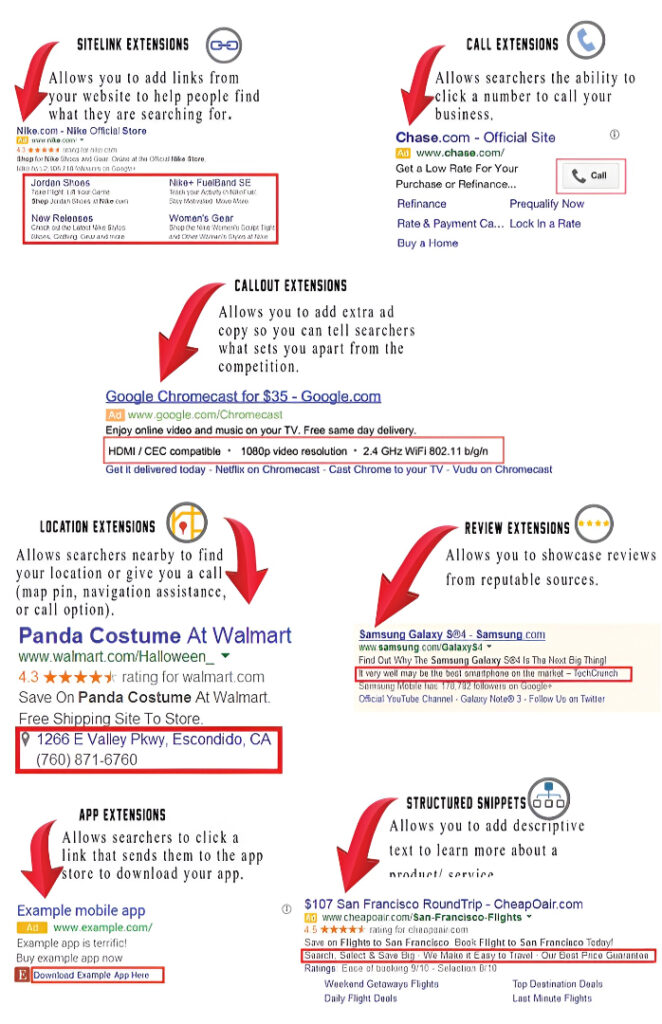
- Missing ad extensions: Sitelinks, callouts, structured snippets, and call extensions can increase CTR by 10–15%. Not using them is free money left behind.
If you want to understand how ad strategy intersects with broader growth marketing, explore how B2B marketing agencies in Bangalore structure paid campaigns for clients at different revenue stages.
Audience targeting errors that waste every rupee
Google Ads gives you extraordinary control over who sees your ads. Most advertisers use almost none of it.
Here are the audience targeting layers you should be using:
Geographic targeting
If you serve clients in Pune, there is no reason your ads should appear in Chandigarh. Go beyond just city-level targeting — use radius targeting around specific areas, and use location bid adjustments to spend more where your best customers cluster.
A Pune-based paid ads agency running Google Ads without tight location targeting will bleed budget on irrelevant searches from other cities.
Device and schedule targeting
When does your ideal customer actually convert?
Most B2B buyers convert during business hours on desktop. But most default campaign settings show ads equally across all devices and all hours. Use bid adjustments to increase spend during peak conversion windows and reduce it during off-hours.
Audience layering
Layer in-market audiences and customer match lists as observation targets. Over time, this tells you which audience segments are actually converting — and you can then bid higher for them.
Bidding strategy mismatches
Google’s smart bidding strategies are powerful — but they need data to work. Using Target CPA or Maximize Conversions on a brand-new campaign with zero conversion history is like asking GPS for directions without knowing your destination.
A sensible bidding progression looks like this:
- Start with Manual CPC or Enhanced CPC to build conversion data (at least 30–50 conversions in the past 30 days)
- Transition to Target CPA once the campaign has enough data
- Move to Target ROAS once you can measure revenue value per conversion reliably
Jumping straight to “Maximize Conversions” with a small, untrained campaign often results in Google spending your entire budget on low-quality traffic chasing a conversion signal it does not fully understand yet.
Conversion tracking: if you can’t measure it, you can’t fix it
This might be the most important section in this entire article.
If your Google Ads account does not have conversion tracking set up correctly, you are essentially flying blind. You can see clicks, impressions, and spend — but you have no idea which keywords, ads, or audiences are actually generating leads or sales.
What you should be tracking
- Form submissions (each form on each landing page)
- Phone calls (minimum 60 seconds duration to qualify as a lead)
- WhatsApp clicks (critical for the Indian market)
- Demo bookings or calendar appointments
- Purchases or checkout completions (for e-commerce)
Set up Google Tag Manager and Google Analytics 4 together, and import your GA4 conversions into Google Ads. This gives Google’s algorithm the clean, verified conversion data it needs to optimise your bids intelligently.
Marketers running campaigns for high-growth companies — especially those working with performance marketing agencies in India — are increasingly tying paid and organic conversion tracking together for a complete attribution picture.
A step-by-step framework to fix your Google Ads
Now that you understand what is going wrong, here is a practical framework to audit and fix your Google Ads campaigns:
Week 1: account audit and cleanup
- Run a Search Terms Report — pause any keywords generating clicks but zero conversions for 30+ days
- Build a negative keyword list with at least 100 terms
- Restructure ad groups so each contains 5–15 tightly related keywords
- Verify conversion tracking is firing correctly on all pages
2: landing page and ad copy overhaul
- Create dedicated landing pages for each campaign — no homepages
- Ensure message match between ad headline and landing page H1
- Rewrite ads using problem-outcome framing, not feature lists
- Add all available ad extensions: sitelinks, callouts, call, structured snippets
3–4: targeting and bidding refinement
- Set geographic and device bid adjustments based on your historical data
- Add audience observation layers and review segment performance weekly
- Switch to a smart bidding strategy only after collecting 30+ conversions
- Set up weekly performance reviews: CPC, CTR, Conversion Rate, Cost Per Lead
Ongoing: test and iterate
Google Ads is not a set-and-forget channel. Run A/B tests on headlines every 3–4 weeks, review search terms weekly, and adjust budgets based on what the data tells you — not what feels right.
If you would rather have experts handle this for you, explore paid media agencies in Bangalore or digital marketing agencies for startups in Bangalore that specialise in paid media for growth-stage companies.
The bottom line
Google Ads should be one of the most measurable, controllable growth channels available to your business. When it is bleeding money with nothing to show, it is never really about the platform — it is about the execution.
Fix your keywords. Fix your landing pages. Set up proper conversion tracking. Build your Quality Score. And stop throwing budget at a strategy that has not been validated yet.
The businesses that win with Google Ads are not the ones with the biggest budgets. They are the ones that take the time to get the fundamentals right — and then scale aggressively once those fundamentals are in place.
Whether you are doing this in-house or working with a digital marketing agency in Hyderabad, a Google Ads agency in Mumbai, or any performance marketing team — apply these fixes, and your cost per lead will drop. Guaranteed.
FAQs
Why are my Google Ads so expensive?
High costs are usually caused by a low Quality Score, broad match keywords triggering irrelevant searches, poor landing page experience, or overly competitive bidding on generic keywords. Improving your Quality Score from 4 to 8 can cut your CPC by up to 50%.
How much should I spend on Google Ads for my business?
There is no universal answer, but a practical starting point is to calculate your target Cost Per Lead and work backwards. If your average lead is worth ₹5,000 and you need 20 leads a month, you need at least ₹1,00,000/month at a ₹5,000 CPL target — before accounting for wasted spend from optimisation gaps.
What is a good conversion rate for Google Ads in India?
Across B2B service industries in India, a 3–6% conversion rate (clicks to leads) is considered good. E-commerce typically sees 1–3%. If you are below 1%, the issue is almost always the landing page or audience mismatch.
Should I use smart campaigns or manual campaigns?
Smart campaigns work well once your account has 30+ conversions per month and a reliable conversion tracking setup. For new accounts or small budgets, start with manual CPC or enhanced CPC to maintain control and build conversion data first.
How long does it take for Google Ads to start working?
Most campaigns need 4–8 weeks to exit the learning phase and start delivering consistent results. Avoid making major changes (budget, bids, targeting) during this window — it resets the algorithm’s learning and prolongs the unstable period.
Can I run Google Ads without an agency?
Yes — but the learning curve is steep and mistakes are expensive. If your monthly budget is under ₹30,000, it is often worth managing in-house using this guide and Google’s Skillshop resources. Above ₹50,000/month, working with a specialist digital marketing agency typically pays for itself in reduced wasted spend within the first quarter.